.png)
Happy Games for Grades PK, K, 1 and 2
We’ve brought Happy Games to our youngest learners because play is a powerful way to learn!
Children learn best when they’re truly involved in what they’re doing. That’s why engagement is at the heart of everything we create: Happy Numbers strikes a balance between fun and learning that helps even the youngest students fall in love with math.
The Happy Numbers team puts a lot of care into making every exercise lively and engaging. Still, we know that working through similar tasks for a long stretch can start to feel monotonous, especially for young children. That’s where Happy Games for Grades PK, K, 1, and 2 comes in! It gives students a refreshing break and lets them use their math skills in a brand-new, playful setting.
Happy Games is designed to grow along with your students. Our first game builds number recognition, careful listening, attention, and quick thinking. As we add new games, students will get even more ways to strengthen early math fluency, logical and spatial thinking, and problem solving, all through play. As a companion to the Happy Numbers course, Happy Games makes learning more enjoyable and helps young learners build a strong, confident foundation in math.
How do students access Happy Games?
We think of Happy Games as a “Fun Friday” activity. Just like in Grades 3–5, it’s a reward that every student can earn by completing their Weekly Target. Both the Time Target and the Task Target need to be met.
Once students start practicing and complete their first task, a progress module appears at the top of the screen. There are two progress bars: the one with a clock shows practice time, and the one with a checklist shows completed tasks. Each bar is divided into three equal parts, so students can easily see how far along they are. The Games button with a gamepad icon sits between the progress bars. The bars fill up as students work through lessons, independently and in any order.

The games unlock only when both bars reach 100%. When that happens, the gamepad icon pulses so students notice right away.

This might sound like a lot for a young learner, but Dino is there to help. As soon as the progress module appears, he walks students through the targets with a short tutorial, so they know exactly what to aim for. As they keep practicing, Dino checks in once more when they fill their first target and celebrates with them when they unlock the games for the first time. After that, students know the routine and can follow their progress on their own.
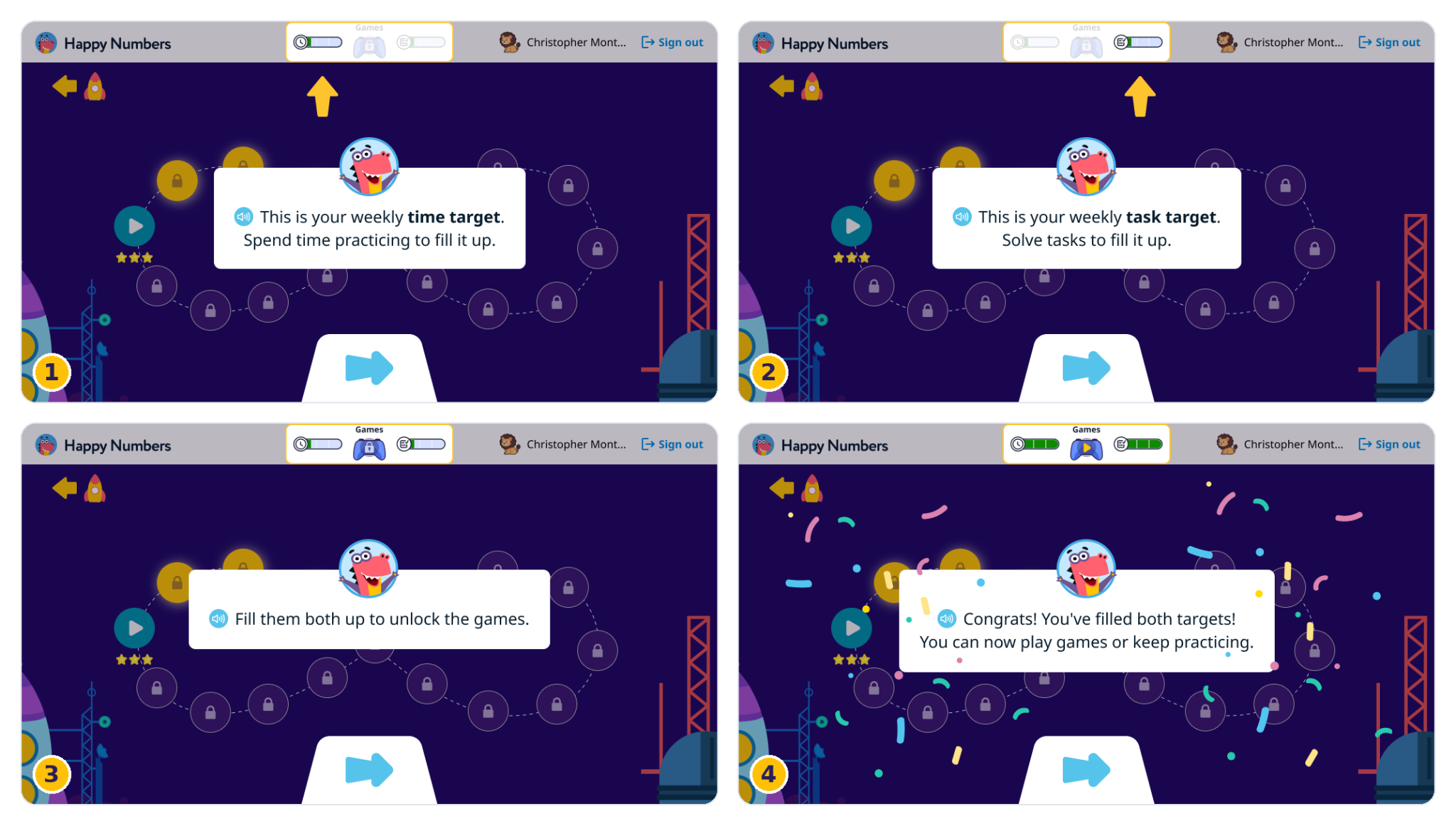
Students can also hover over either progress bar on a computer or tap it on a tablet or phone to see how many minutes they’ve practiced and how many tasks they’ve solved today and this week.

Weekly Targets reset to 0 every Monday. The progress bars empty out, and Happy Games is locked again until the targets are met. Once the games are unlocked, they stay open for the rest of that week.
What if a student doesn’t want to play games?
That’s absolutely fine! Once the games are unlocked, students can choose to play or simply keep working on their lessons. They can always come back to the games later in the week.
Is Happy Games adapted to the student’s level?
Yes! The content inside each game is adapted to the student’s grade, so Pre-K students and second graders each get tasks that fit where they are in their learning. Students don’t need to choose anything themselves: the game picks up their grade automatically from their Happy Numbers account.
If a student moves to a higher grade, the game adjusts to match, and their progress is taken into account wherever possible. Game progress is also saved automatically, so students can always pick up where they left off.
How can I block Happy Games for my students?
To block Happy Games, you can increase the Weekly Target for your whole class or for individual students. You know your class best, but we suggest not blocking Happy Games for everyone. Switching from exercises to a game helps students avoid fatigue and stay motivated.
What games are available now?
To find out, students have to reach their Weekly Target! But since you’re the teacher, here’s a sneak peek.
Bring Back the Light
Bring Back the Light helps students recognize numbers by ear. A row of broken lamps sits on a shelf, and students repair them one by one with their friendly helper, Sparks.
In each round, bubbles with different numbers appear on the screen. Sparks says a number out loud, and the bubbles start to shrink. Students need to tap or click the right number before the bubbles get too small. The numbers appear in a different font in each round, so students learn to recognize them in different styles. If a student picks the wrong bubble, Sparks says, “Whoopsie! Try again!” and the student can try again while the round is still on.
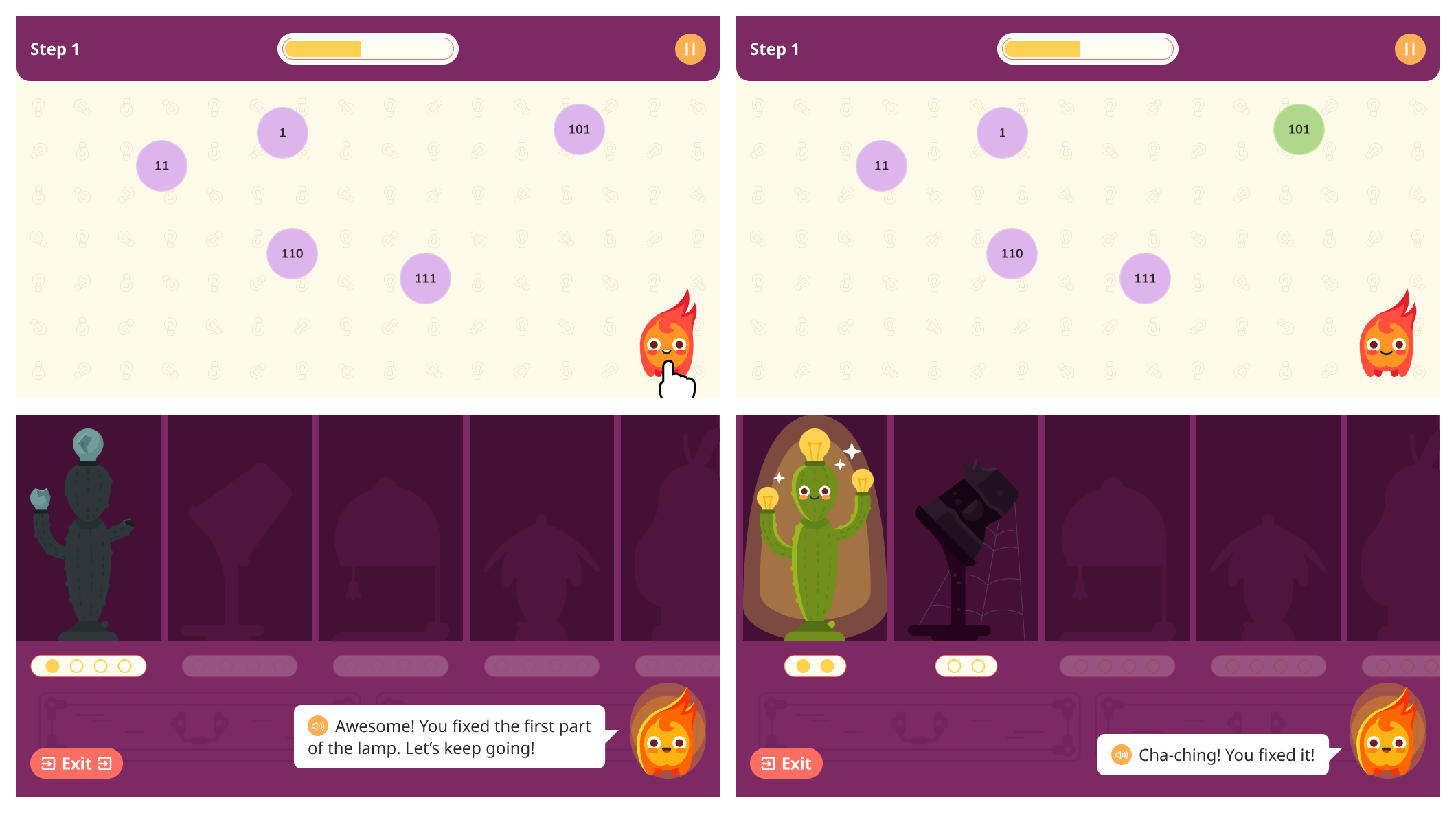
Every successful stage brings a lamp closer to shining again. If a student misses a number, the stage simply starts over. Once all 10 lamps are glowing, the student has completed the game.
More games are on the way!
Bring Back the Light is just the beginning. Our team is already working on the next Happy Game for Grades PK–2, and it’s coming soon. Stay tuned!
Where can I see students’ results?
While playing Happy Games, students practice number skills and sometimes make mistakes along the way. We know you’d love to see the details of this process, so we’re planning a report that will show how students perform in the games. We’ll let you know as soon as it’s ready!
The big picture
Happy Games is our way of showing young learners that math can be both challenging and fun. Every week, students work hard to reach their targets, and a game at the end of that journey makes their effort feel truly rewarding.
We hope you and your students will enjoy Happy Games as a fun reward for reaching Weekly Targets and a joyful way to build early math skills!